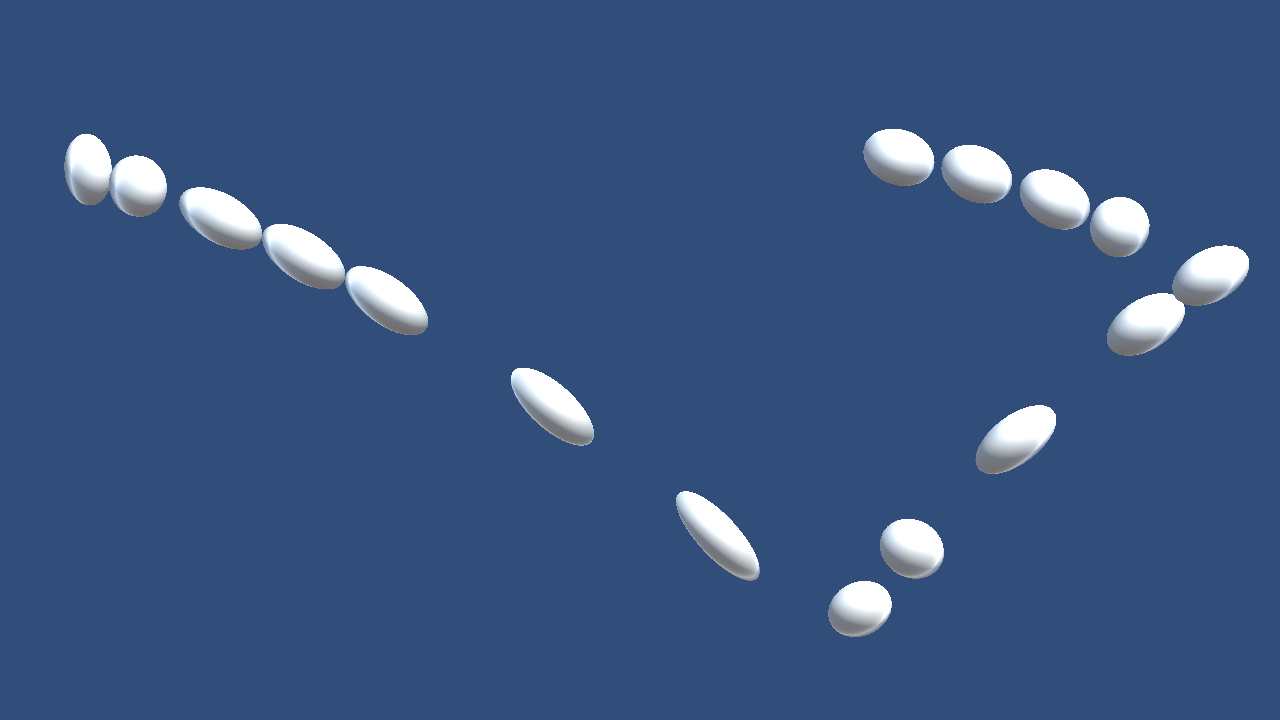
Figure 8.1: Sphere deforms
Figure 8.1: Sphere deforms
When expressing the softness of an object, we sometimes imitate a spring or calculate a simulation of a fluid or soft body, but here we do not make such an exaggerated calculation, but express the soft deformation of the object. to watch. As shown in the figure, it is a transformation like a hand-drawn animation.
The sample in this chapter is "Over Reaction" from
https://github.com/IndieVisualLab/UnityGraphicsProgramming3
.
In the "Over Reaction" scene, you can see the basic transformation. Watch the object move and transform from the manipulator or Inspector.
In the "Physics Scene" scene, you can apply force to the object with the up, down, left, and right keys. If you place some objects on the scene, you can see how they transform depending on the situation.
There are many possible transformation rules, but there are probably only three basic rules.
Here, we will especially consider when the object moves, so first we will detect the direction and magnitude of the movement. Although different from the term used in the laws of physics, this parameter moveEnergyis called "kinetic energy" for convenience . Since kinetic energy is a parameter expressed by direction and magnitude, it can be expressed by a vector.
* Kinetic energy is the correct physics term. Here, it is named "move energy" because it is an energy that considers only movement.
This is not the case as it is treated as a matter of course in game programming, but the movement of an object simply detects a change in coordinates. The only thing I want to note is that Updateit uses instead FixedUpdate.
OverReaction.cs
protected void FixedUpdate()
{
    this.crntMove = this.transform.position - this.prevPosition;

    UpdateMoveEnergy();
    UpdateDeformEnergy();
    DeformMesh();

    this.prevPosition = this.transform.position;
    this.prevMove = this.crntMove;
}
FixedUpdateIs a method that is called at regular intervals, so it's Updateclearly different in nature from being called twice or three times per second . I will omit the details of these differences because it is out of the main subject, but FixedUpdateI adopted it here because I want to support the movement of objects using PhysX (physical behavior) of Unity . There Updateis no particular need to deform the mesh as often as.
Now that the movement of the object can be calculated from the change in coordinates, let's calculate the kinetic energy. The calculation of kinetic energy is UpdateMoveEnergyimplemented in the method.
OverReaction.cs
protected void UpdateMoveEnergy()
{
    this.moveEnergy = new Vector3()
    {
        x = UpdateMoveEnergy
        (this.crntMove.x, this.prevMove.x, this.moveEnergy.x),

        y = UpdateMoveEnergy
        (this.crntMove.y, this.prevMove.y, this.moveEnergy.y),

        z = UpdateMoveEnergy
        (this.crntMove.z, this.prevMove.z, this.moveEnergy.z),
    };
}
Kinetic energy is calculated by decomposing into each component in the X, Y, and Z directions. The following UpdateMoveEnergyprocesses will be explained step by step.
First, consider the case where there is no current movement. When there is no movement, the existing kinetic energy decays.
OverReaction.cs
protected float UpdateMoveEnergy
(float crntMove, float prevMove, float moveEnergy)
{
    int crntMoveSign = Sign(crntMove);
    int prevMoveSign = Sign(prevMove);
    int moveEnergySign = Sign(moveEnergy);

    if (crntMoveSign == 0)
    {
        return moveEnergy * this.undeformPower;
    }
…
}

public static int Sign(float value)
{
    return value == 0 ? 0 : (value > 0 ? 1 : -1);
}
When the current movement and the previous movement are reversed, the kinetic energy is reversed.
OverReaction.cs
if (crntMoveSign != prevMoveSign)
{
    return moveEnergy - crntMove;
}
When the current movement and the kinetic energy are reversed, reduce the kinetic energy.
OverReaction.cs
if (crntMoveSign != moveEnergySign)
{
    return moveEnergy + crntMove;
}
In cases other than the above, when the current movement and the kinetic energy are in the same direction, the current movement and the existing kinetic energy are compared and the larger one is adopted.
However, the kinetic energy decays and becomes smaller. In addition, the new kinetic energy generated by the current movement is increased by multiplying it by any parameter so that it can easily produce deformation.
OverReaction.cs
if (crntMoveSign < 0)
{
    return Mathf.Min(crntMove * this.deformPower,
                     moveEnergy * this.undeformPower);
}
else
{
    return Mathf.Max(crntMove * this.deformPower,
                     moveEnergy * this.undeformPower);
}
With this, the kinetic energy to be used for deformation could be calculated.
It then converts the calculated kinetic energy into parameters that determine the deformation. For convenience, this parameter deformEnergyis called "deformation energy" . The deformation energy is UpdateDeformEnergyupdated by the method.
The magnitude of deformation energy can be defined as the magnitude of kinetic energy as it is, but if there is a discrepancy between the direction of deformation energy and the direction in which the object is moving, the deformation energy is completely in the object. I can't tell. It is also possible that the direction of deformation energy and the direction in which the object is moving are reversed.
Therefore, the amount of deformation energy transmitted is calculated from the inner product of the deformation energy and the current movement. If the directions are exactly the same, the inner product of the unit vectors will be 1, and will gradually approach 0 depending on the magnitude of the deviation. When it is further inverted, it becomes a negative value.
OverReaction.cs
protected void UpdateDeformEnergy()
{
    float deformEnergyVertical
    = this.moveEnergy.magnitude
    * Vector3.Dot(this.moveEnergy.normalized,
                  this.crntMove.normalized);
    …
Now that we have calculated the force that deforms the object in the vertical direction, it deforms in the horizontal direction by the amount of change in the vertical direction. In other words, if the object stretches vertically, it will shrink horizontally. On the contrary, when it shrinks in the vertical direction, it should stretch in the horizontal direction.
The amount of deformation in the vertical direction is calculated by "the magnitude of the deformation in the vertical direction / the maximum magnitude of the deformation". After that, it is calculated so that it deforms in the horizontal direction as much as it deforms in the vertical direction.
Assuming that the deformation is +0.8 in the vertical direction, the deformation should be -0.8 in the horizontal direction, so the deformation energy in the horizontal direction is 1-0.8 = 0.2. Also, as the coefficient for actual deformation, * 0.8 is small, so add 1 to make it * 1.8.
OverReaction.cs
protected void UpdateDeformEnergy()
{
…
    float deformEnergyHorizontalRatio
    = deformEnergyVertical / this.maxDeformScale;

    float deformEnergyHorizontal
    = 1 - deformEnergyHorizontalRatio;
…
    deformEnergyVertical = 1 + deformEnergyVertical;
}
Finally, consider the case where the object collapses in the direction of travel. The case where the object collapses in the direction of travel is when the kinetic energy and the current movement are reversed, that is, when the previous "inner product of the kinetic energy and the current movement" is negative.
When the value of the inner product is negative, the deformation energy in the vertical direction and the deformation energy in the horizontal direction are reversed.
To help you understand the case, the following code is a continuation of the previous steps. When the dot product value is negative, deformEnergyHorizontalis a positive value greater than 1. Or deformEnergyVerticalis deformEnergyHorizontalof value reversed with, it will be one less than the positive value.
OverReaction.cs
protected void UpdateDeformEnergy()
{
    float deformEnergyVertical
    = this.moveEnergy.magnitude
    * Vector3.Dot(this.moveEnergy.normalized,
                  this.crntMove.normalized);

    float deformEnergyHorizontalRatio
    = deformEnergyVertical / this.maxDeformScale;

    float deformEnergyHorizontal
    = 1 - deformEnergyHorizontalRatio;

    if (deformEnergyVertical < 0)
    {
        deformEnergyVertical = deformEnergyHorizontalRatio;
    }

    deformEnergyVertical = 1 + deformEnergyVertical;
…
Finally, correct the value so that the deformation energy falls within the arbitrarily set range, and complete the calculation of the deformation energy.
OverReaction.cs
deformEnergyVertical = Mathf.Clamp(deformEnergyVertical,
                                    this.minDeformScale,
                                    this.maxDeformScale);

deformEnergyHorizontal = Mathf.Clamp(deformEnergyHorizontal,
                                        this.minDeformScale,
                                        this.maxDeformScale);

this.deformEnergy = new Vector3(deformEnergyHorizontal,
                                deformEnergyVertical,
                                deformEnergyHorizontal);
Here, the mesh is transformed with a script for explanation and generalization. The transformation of the mesh is DeformMeshimplemented in the method.
* Since it is a matrix operation, it is often better to process it on the GPU using a shader for practical purposes.
The obtained deformation energy deformEnergyis moveEnergya vector representing expansion and contraction when facing the direction of kinetic energy . Therefore, when transforming, it is necessary to match the coordinates before transforming. First, suppress the parameters required for that purpose. The rotation matrix of the current object and its inverse matrix, the kinetic energy moveEnergyrotation matrix and its inverse matrix.
OverReaction.cs
protected void DeformMesh()
{
Vector3[] deformedVertices = new Vector3[this.baseVertices.Length];

Quaternion crntRotation  = this.transform.localRotation;
Quaternion crntRotationI = Quaternion.Inverse(crntRotation);

Quaternion moveEnergyRotation
= Quaternion.FromToRotation(Vector3.up, this.moveEnergy.normalized);
Quaternion moveEnergyRotationI = Quaternion.Inverse(moveEnergyRotation);
…
deformEnergyaccording to the vertices .deformEnergyIf you give an appropriate deformation energy in an easy-to-understand manner and comment out the source code in sequence, the processing procedure will be easier to understand.
OverReaction.cs
for (int i = 0; i < this.baseVertices.Length; i++)
{
    deformedVertices[i] = this.baseVertices[i];
    deformedVertices[i] = crntRotation * deformedVertices[i];
    deformedVertices[i] = moveEnergyRotationI * deformedVertices[i];
    deformedVertices[i] = new Vector3(
        deformedVertices[i].x * this.deformEnergy.x,
        deformedVertices[i].y * this.deformEnergy.y,
        deformedVertices[i].z * this.deformEnergy.z);
    deformedVertices[i] = moveEnergyRotation * deformedVertices[i];
    deformedVertices[i] = crntRotationI * deformedVertices[i];
}

this.baseMesh.vertices = deformedVertices;
I was able to transform the object with a very simple implementation. Although it is so easy to implement, the impression it gives to the appearance changes greatly.
Although the calculation cost is higher, it is possible to support the rotation and enlargement / reduction of the object, move the center of gravity of the deformation, and support the skin mesh animation as an advanced form.